Templates That Adapt to Your Needs
Zero hardcoded prompts. Full control over AI behaviour. Customise every template to match your clinic's documentation standards—all without writing a single line of code.
See Template ExamplesWhy Template Flexibility Matters
Most AI medical scribe solutions use fixed, one-size-fits-all templates. This means you're forced to adapt your documentation workflow to match their system, rather than the system adapting to you.
Every clinic has unique documentation requirements. A cardiology practice needs different note structures than a pediatric clinic. A GP practice needs MBS-aligned documentation, while a mental health practice needs different assessment formats.
SynapseMD gives you complete control, allowing you to configure AI behaviour for every document type to match your exact needs—without any technical expertise required.
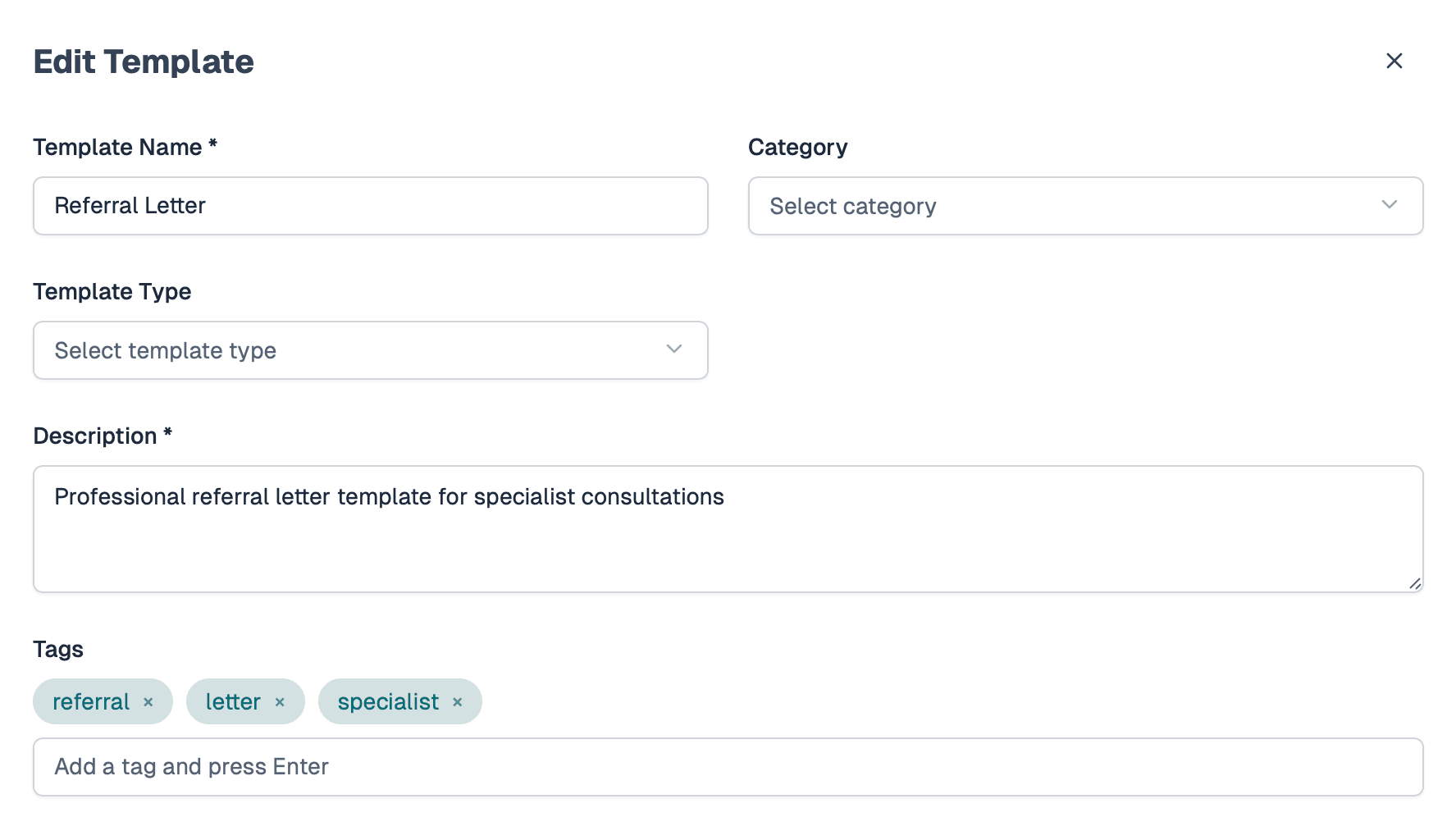
Complete Template Control
Every aspect of template behaviour is configurable through our intuitive interface
Zero Hardcoded Prompts
Every AI prompt is fully customisable. No hidden prompts, no locked configurations. You control exactly how the AI generates each document type.
Template Variables
Use dynamic variables to pull in patient data, consultation transcripts, and other context into your templates. Build templates that adapt to each consultation automatically.
AI Configuration
Adjust AI model settings per template, including temperature, response length, and other parameters to fine-tune output quality for each document type.
Priority Management
Set generation priorities for templates. Control which documents are created first and ensure critical documentation is ready when you need it.
Version Control
Track template changes over time. Review what changed, when, and by whom. Roll back to previous versions if needed.
Access Controls
Control who can view, edit, or manage templates. Perfect for practices with multiple clinicians or network-wide standardization needs.
Available Template Types
Configure templates for any document type your practice needs
SOAP Notes
Subjective, Objective, Assessment, and Plan documentation with customisable sections and formatting.
Consultation Summaries
Comprehensive visit summaries that capture key findings, decisions, and follow-up requirements.
Referrals
Specialist referral letters with customisable sections for clinical history, reason for referral, and urgency.
Discharge Summaries
Hospital discharge documentation with medication lists, follow-up instructions, and care plans.
Progress Notes
Ongoing patient progress tracking with customisable assessment and intervention sections.
Prescriptions
Medication documentation with dosage, frequency, and duration in your preferred format.
Real-World Use Cases
See how different practices customise templates to match their unique needs
General Practice - MBS Alignment
A Brisbane GP clinic customised their consultation summary templates to automatically include MBS item numbers, billing codes, and Medicare requirements. The templates ensure every note is billing-ready and compliant with Australian Medicare requirements.
- ✓Automatic inclusion of relevant MBS item numbers
- ✓Structured sections matching Medicare documentation requirements
- ✓Consistent formatting for easy billing team review
Cardiology Practice - Specialty Format
A cardiology specialist practice in Sydney created templates that emphasize cardiovascular assessments, medication management, and diagnostic test results. The templates automatically structure notes to highlight cardiac-specific findings and treatment plans.
- ✓Cardiac-specific assessment sections (ECG findings, echo results, etc.)
- ✓Medication management with cardiac drug interactions highlighted
- ✓Structured format for easy specialist referral documentation
Multidisciplinary Team - Shared Care Plans
An Auckland health network standardised templates across multiple practices, ensuring consistent documentation for shared care plans. Templates include sections for each team member's input and standardised assessment formats.
- ✓Consistent formatting across all team members
- ✓Shared care plan sections for GP, specialist, and allied health input
- ✓ACC-compliant documentation for New Zealand requirements
Why Template Flexibility Matters
Adapt to Your Workflow, Not the Other Way Around
With fixed templates, you're forced to change how you document patient care to match the system. This creates friction, reduces adoption, and can impact patient care quality.
SynapseMD's flexible template system means you configure the AI to match your existing documentation standards. Your workflow stays the same—you just get AI assistance that understands your requirements.
- No workflow disruption—templates match your existing processes
- Faster adoption—clinicians see familiar documentation formats
- Better compliance—templates ensure all required information is captured
Scale Across Your Organisation
For health networks and multi-practice organisations, template flexibility enables standardisationwhile respecting local variations. Deploy consistent templates across all practices, or allow individual practices to customise while maintaining core standards.
- Network-wide standardisation with local customisation options
- Template sharing and version control for consistency
- Specialty-specific templates for different practice types
Expert Support for Every Customization
Our client onboarding team is here to help with any template customisation you need. From initial setup to ongoing refinements, we ensure your templates perfectly match your clinic's needs.
Initial Setup
Get started with personalized template configuration tailored to your practice
Specialty Customization
Adapt templates to match your specialty requirements and documentation standards
Ongoing Refinements
Continuously optimize and refine your templates as your practice evolves
Best Practices
Learn workflow optimization and documentation best practices from our experts
Dedicated Onboarding Team
Our team works with you to understand your documentation needs and helps configure templates that match your exact requirements—every step of the way.
Ready to Customise Your Templates?
Our team can help you configure templates that match your clinic's documentation requirements. See examples, get guidance, and start customising in minutes.
Templates That Grow With You
As your practice evolves, your templates can too. Update prompts, add new document types, or refine existing templates—all without technical support.
Start Free Trial